The landscape of generative AI is undergoing a massive shift. We are rapidly moving past the era of stateless, single-turn chatbots and entering the era of autonomous agents: software entities capable of orchestrating multi-step, goal-oriented operations by reasoning through complex problems and executing programmatic tools.
Whether you are building an agent to automate data engineering pipelines, act as a tier-1 customer support representative, or serve as an autonomous Site Reliability Engineer (SRE) to debug infrastructure, you will inevitably collide with one of the most notoriously difficult challenges in agentic engineering: managing state.
When your agent needs to handle complex, multi-step tasks over an extended period, managing the "memory" of that conversation can quickly become a bottleneck. This is where the Gemini Interactions API, now Generally Available (GA),comes in.
In this article, we will explore the limitations of traditional stateless agent architectures, dissect how the Interactions API solves these problems through server-side state graphs, and architect a robust DevOps agent capable of diagnosing and resolving infrastructure failures.
The Stateless Anti-Pattern: The Hidden Costs of Client-Side Memory
To appreciate the leap forward the Interactions API represents, we must first examine how most developers are forced to build agents today using standard completions or generateContent endpoints.
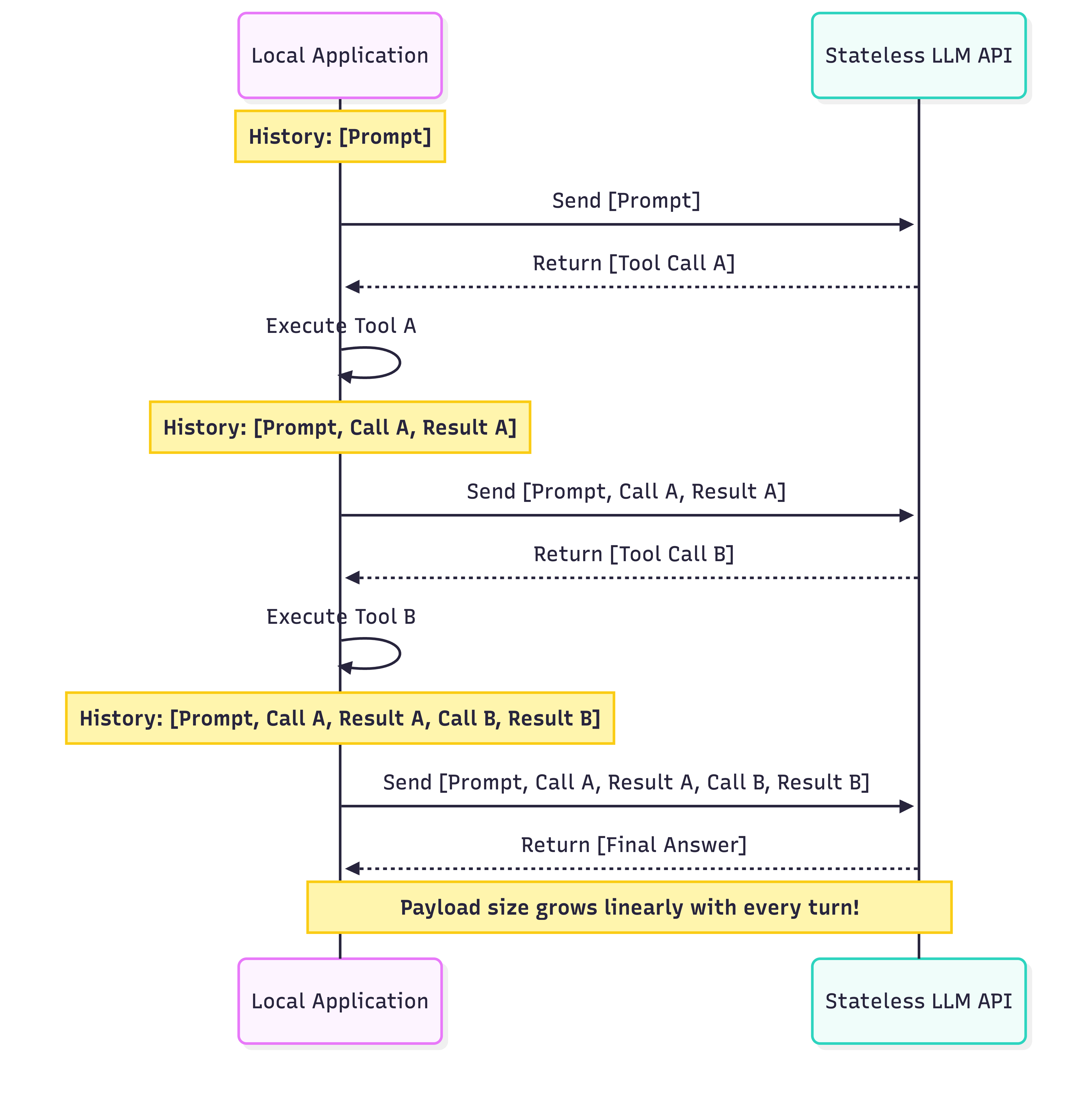
Standard LLM APIs are inherently stateless. The model retains zero memory of your conversation between API calls. To simulate memory, the developer's local application must maintain an ever-growing array of JSON objects representing the entire history of the session.
If you are building an agent that executes tools, this array gets incredibly complex. Every time the model uses a tool, your client code must intercept the intent, execute the local function, and carefully stitch the result back into the history array before sending the entire log back to the server.
The Legacy Approach
Here is a conceptual snippet of what that legacy client-side state management looks like in code. Notice how you have to manually parse and append every single interaction turn:
Here is a visual representation of the payload bloat in traditional client-side state management:
The Paradigm Shift: Server-Side State with the Interactions API
The Gemini Interactions API fundamentally redesigns this architecture by moving the state graph server-side.
Instead of treating your request as an isolated prompt, the API treats it as a node in an ongoing interaction graph. When you initiate a session, the API returns an interaction.id. To continue the conversation or to supply the result of a tool execution, you drop the history array entirely and simply pass that ID.
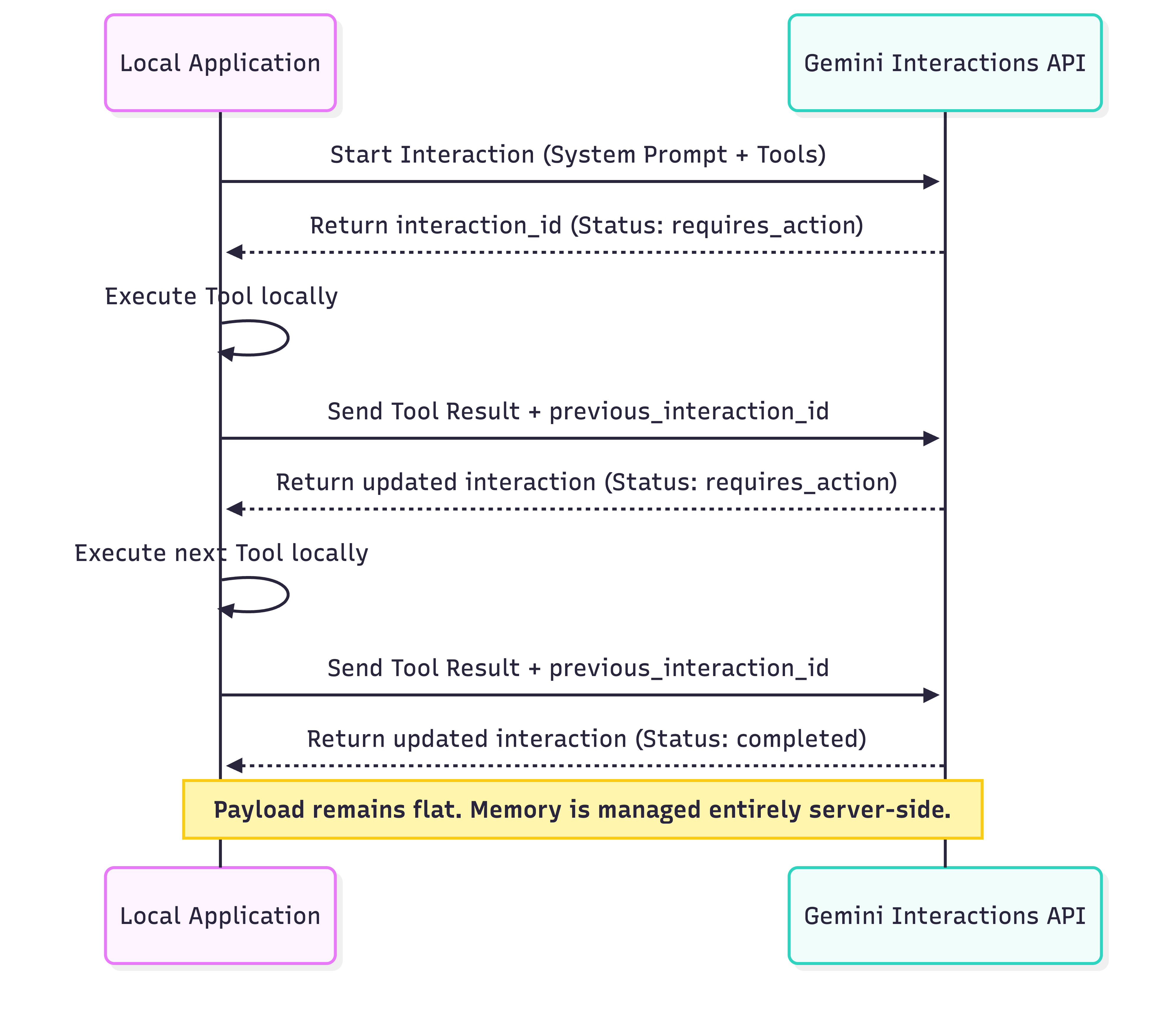
By passing a previous_interaction_id, your agent natively "remembers" its past actions. You send a flat, minimal payload containing only the newest piece of information, drastically reducing input tokens and completely eliminating local array management.
Architecting a DevOps Agent
To see the power of this framework, let's architect a sophisticated DevOps Agent designed to act as an SRE. We'll give it the ability to diagnose issues in a microservices environment.
In a production scenario, you must enforce a strict Separation of Concerns. We will divide our architecture into three distinct pillars:
- The Environment: The systems the agent is interacting with (e.g., Kubernetes clusters, Datadog APIs, GCP Compute).
- The Tools: Native Python functions exposed to the model via strict OpenAPI schemas.
- The Orchestration Loop: The core runtime that talks to the Interactions API, intercepts tool requests, and executes the local functions.
Part 1: Defining Robust Tool Schemas
AI models cannot natively run commands in your terminal. We must define Python functions that wrap our infrastructure SDKs, and then translate those functions into OpenAPI JSON schemas for the model to understand.
Here is a snippet showing how you might define a tool for an agent. Notice how the description provides explicit guardrails:
Part 2: Initialising the Session
With our tools defined, we establish the baseline state. We define the agent's persona and provide the initial event (the PagerDuty alert).
Part 3: The Autonomous Orchestration Loop
To make the agent autonomous, we need a runtime loop that catches the requires_action signal, parses the requested tool, executes it locally, and feeds the result back to the API.
This snippet highlights the core interaction pattern. The magic lies entirely in the previous_interaction_id:
This compact block replaces hundreds of lines of fragile array manipulation code. If your tool crashes and throws a Python exception, you can easily catch it and feed the error string back into the input field. The model will read the error in the context of its previous steps, and can dynamically choose to try an alternative approach.
The Reasoning Trace and Observability
In production SRE environments, accountability is paramount. You cannot simply let an AI scale down a cluster without knowing why it made that decision.
Unlike stateless endpoints that return a flat string, the Interactions API returns an interaction.steps array. This provides a transparent, chronological ledger of the model's entire reasoning process.
If you inspect the steps array after a session, it looks like an audit log:
- Step 1: User Input (PagerDuty Alert)
- Step 2: Model requests
fetch_cluster_metrics - Step 3: Tool Result provided (CPU spiked)
- Step 4: Model requests
fetch_pod_logs - Step 5: Tool Result provided (OutOfMemoryException)
- Step 6: Model requests
rollback_deployment - Step 7: Tool Result provided (Success)
You can serialise this interaction.steps array directly into JSON and export it to an observability platform (like Datadog or Google Cloud Logging) to create automated, auditable incident reports.
Advanced Architecture: Stateful Branching
One of the most powerful and entirely unique features of the Interactions API is Stateful Branching.
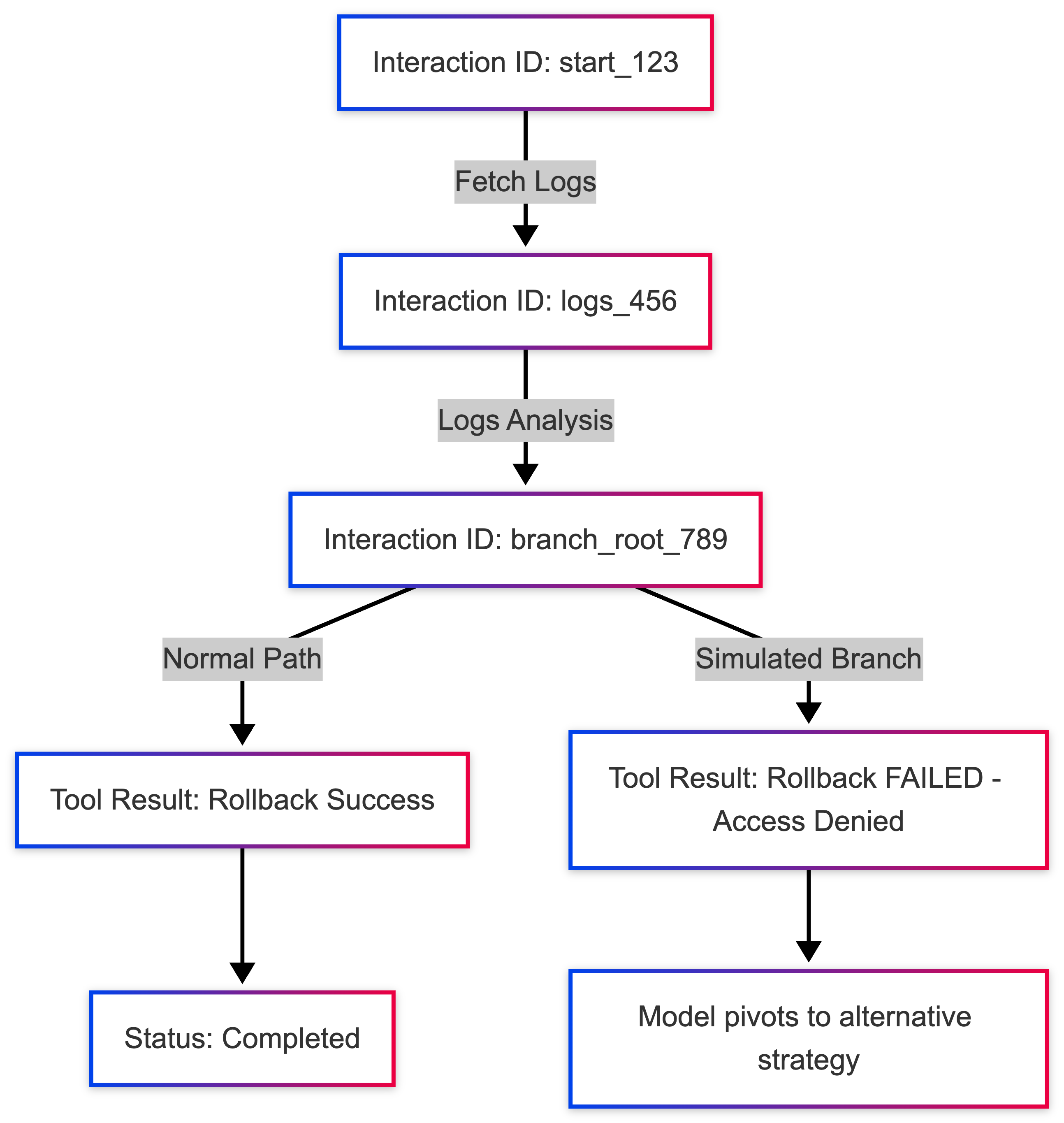
Because the entire conversation history is stored on the server as a graph of nodes indexed by the interaction_id, you are not forced to move strictly forward. You can take any historical interaction_id from the middle of a session and pass it into a new request to branch the timeline.
Why Branching Matters
Imagine your agent decides to execute a rollback_deployment. In your staging environment, you want to test how the agent would react if the rollback completely failed. You do not need to run the entire scenario from the beginning, spending tokens on fetching logs and metrics again.
You simply grab the interaction_id from the exact moment before the rollback result was provided, and inject a simulated error on a new branch:
The Branching Code Snippet
To simulate this in code, you just make a new create call using the old ID.
The model instantly pivots, retains all context up to branch_root_789, and attempts to formulate a new recovery strategy (e.g., restarting the pod instead). This capability allows developers to build massive Monte Carlo simulations of their agent's decision-making trees, testing thousands of edge cases without recalculating the baseline state.
Conclusion & Next Steps
The Gemini Interactions API is a leap forward for agentic engineering. By offloading state management to a server-side graph, it allows developers to focus on what actually matters: defining robust tools, crafting effective system instructions, and building resilient orchestration loops.
If you are ready to implement this in production, consider these next steps:
- Implement Human-in-the-Loop (HITL): Before calling critical tools like
rollback_deployment, pause your Pythonwhileloop and require a human operator to typeY/Nin the console before passing the execution result back to the API. - Build an Audit Exporter: Write a utility function that parses the
interaction.stepsarray and formats it into a Slack message or a Jira ticket upon completion. - Explore the Docs: Check out the Gemini API Interactions Overview to learn more about advanced parameter passing and nested objects in tool schemas.
The era of manual array manipulation is over. It's time to build smarter, stateful agents.
References & Further Reading
- Gemini Interactions API: Overview & Guide
- Function Calling: Complex Parameter Definitions