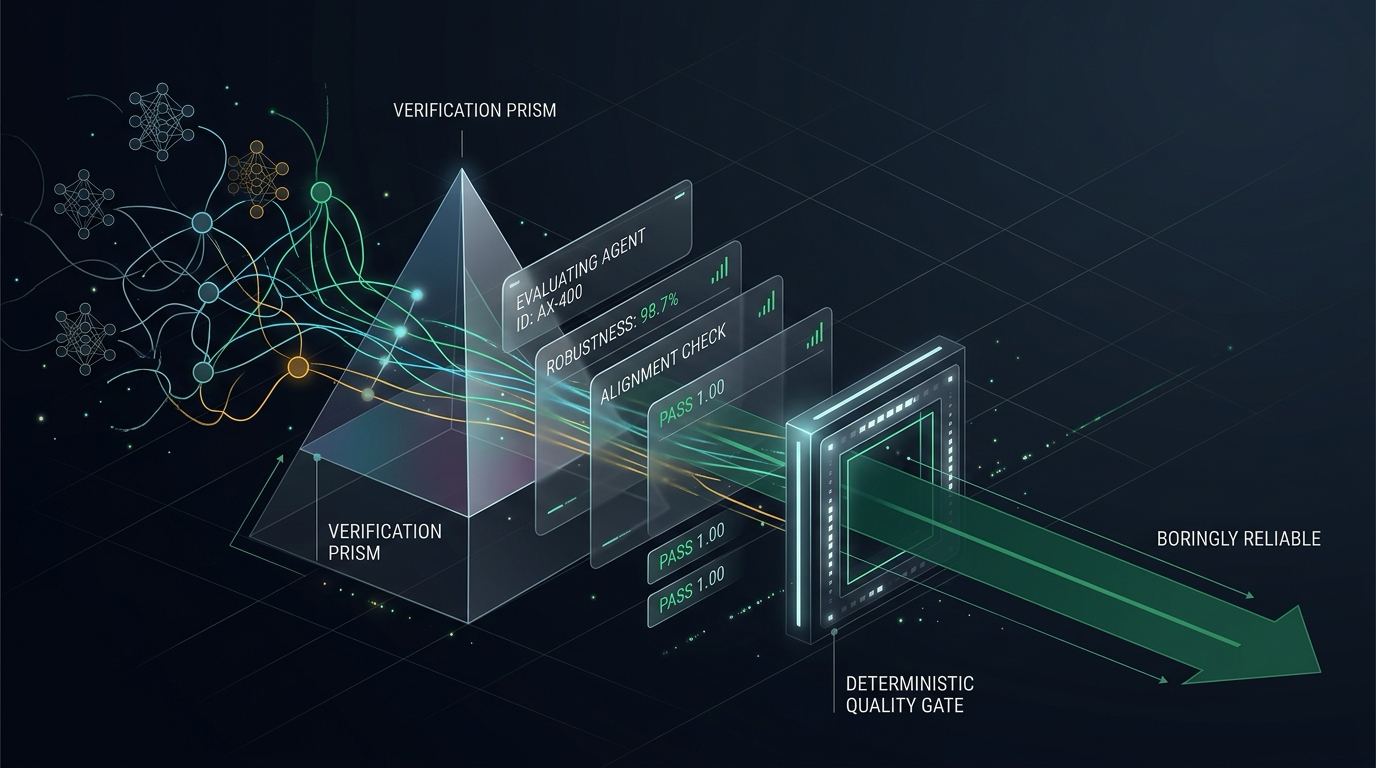
I build agents for a living, which means I have broken a lot of them. At DevFest Belgrade 2026 I gave a talk called Mastering Agent Evaluation: 45 minutes spent taking an agent that lies with total confidence and making it boringly reliable. Boring is the goal.
This article is the written version of that talk. Everything in it is real: the agent, the eval sets, the traces and the scores all live in the skadarlija-concierge repository. The repo ships pre-computed artefacts from real Gemini 3.8 Flash runs on Gemini Enterprise Agent Platform, so you can inspect every trace and rerun every gate offline, without a Google Cloud project.
In this article, we will walk the full quality loop with agents-cli: benchmark, grade, diagnose, compare, optimise and finally gate merges in CI.
The Friday Demo
Meet the Skadarlija Concierge, a restaurant-booking agent for Belgrade's bohemian quarter, built with the Agent Development Kit (ADK). It can search restaurants, read a menu, book a table and cancel one. One Gemini model, a short instruction, a handful of tools.
It is Friday, 17:00. We demo it to the stakeholders:
The stakeholders are very impressed. We ship.
The Monday Incidents
Monday, 09:12. Four incidents are waiting in the queue, and not one of them was caught by anything we had in place.
| Incident | Severity | What happened | Caught by |
|---|---|---|---|
| INC-01 Overbooking | Critical | Booked a table for 40. The guest wrote "4, oh and 0 kids". | Nothing |
| INC-02 Fake venue | High | Recommended "The View Rooftop". It was never in a search result. | Nothing |
| INC-03 Table for zero | Critical | Asked for troje (three). It booked 0, then told her 3. | Nothing |
| INC-04 Wrong name | High | Said the booking was under Milica. It was saved as "guest". | Nothing |
Every one of these passed the vibe check: an engineer typed a prompt into a chat window, the answer looked sensible, and it shipped. The rest of this article is about building the system that catches all four before the Friday deploy.
Why Agents Break Your Testing Habits
With classic code, the same input gives the same output, so you assert an exact value. With a single LLM call, the output mostly differs run to run, so you assert that it is similar to a reference. With an agent, you do not even get the same path twice.
| System | Same output? | You assert | It fails at |
|---|---|---|---|
| Classic code | Yes | An exact value | Your code |
| Single LLM call | Mostly not | Similarity to a reference | The response |
| Agent | Not even the same path | The answer and every step | Any step, compounding |
That last column is the one that hurts. Errors in an agent compound across steps:
If every step is 90% right, a five-step task is right only 59% of the time. And an agent can reach the right destination by the wrong route: you asked for the airport from Slavija and it drove you via Novi Sad. You arrived, but nobody is happy.
Five Layers of Agent Quality
Before writing a single eval, decide what you are measuring. I think about agent quality in five layers, from the bottom up:
- Operational: latency, tokens and cost.
- Safety and grounding: does it only say what its tools returned? (
INC-02,INC-04) - Tool calls: the right tool, with the right arguments. (
INC-01,INC-03) - Trajectory: the right tools, in the right order.
- Final response quality: is the answer actually good?
Notice where the incidents land. Not one of them is a final-response problem.
A few terms we will use throughout:
- Eval case: one scenario plus what good looks like.
- Trajectory: the sequence of tool calls the agent made.
- Rubric: a written pass/fail criterion.
- Judge: the model that applies a rubric.
The Quality Flywheel
Agent evaluation is not a test you run once before launch. It is a loop, and agents-cli gives every step of it a command.
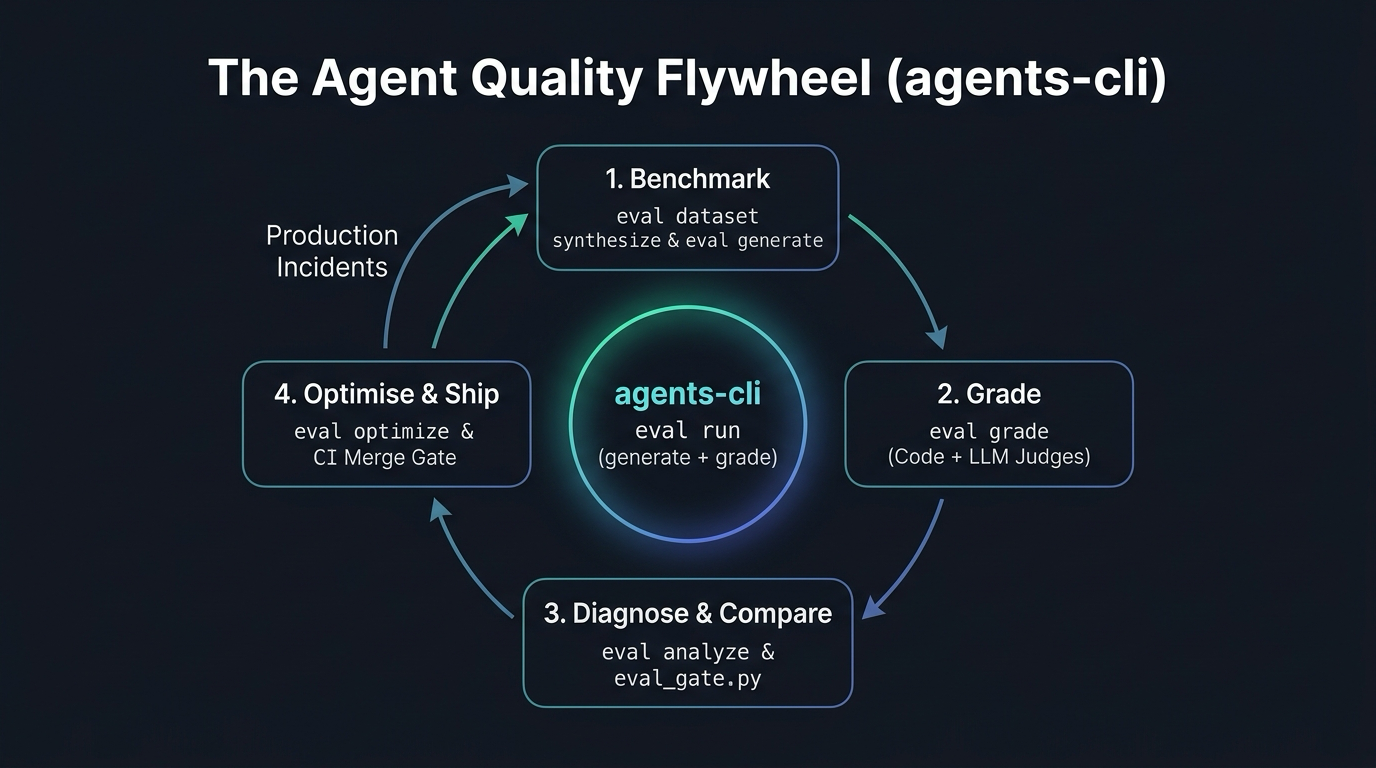
The core loop is agents-cli eval run, which is generate plus grade in one command. The rest of this article walks the loop in four acts: benchmark, grade, diagnose and compare, then optimise and ship.
Act 1: Benchmark
An Eval Case is a Contract
An eval case is a contract between you and the agent: this conversation, and what good looks like. Here is the case behind INC-01 and INC-04, simplified (in the real file, each text sits in content.parts):
Three details matter here:
- Tags become slices later. They are how a 75% average gets broken down into the 0% slice it is hiding.
- History: earlier turns are seeded as context.
- Live turn: the agent answers the last user turn for real.
Three Sources of Eval Data
| Source | How many | What it covers |
|---|---|---|
| Hand-written | 20 to 50 cases | The flows that would get you fired |
| Synthetic users | Dozens to hundreds | A simulated user plays out scenarios |
| Production incidents | Grows over time | Real failures, scrubbed of personal data, added as cases |
For synthetic data, agents-cli uses two models: one writes a realistic persona and scenario, the other plays that user in a live dialogue with your agent.
One scenario it produced for the Concierge: a guest who switches between English and Serbian, opens with "Brate, I need a place for dinner this Friday", then changes the booking from 4 people to 6 halfway through, in Serbian.
Generate Traces, Not Just Answers
The next step runs the agent against the dataset and records the full trace: every user turn, model call, tool call with its arguments, tool result and the final answer.
The trace is where the truth lives. Here is the book call from INC-01, straight out of demo/v1/traces.json:
The model passed the party size through as the user said it. The v1 tool glued every digit it found together: 4 and 0 became 40. On the stage, source demo/aliases.sh gives you d1call, d1resp and d1scores to pull exactly these lines out with jq.
Because agents are non-deterministic, run each case more than once and know which number you are reporting:
pass@k: the case succeeded at least once inkruns.pass^k: the case succeeded in every one ofkruns. This is what users feel.
Act 2: Grade
Use the Cheapest Grader That Works
| Grader | Cost | Use it for |
|---|---|---|
| Code | Free, instant, repeatable | Bounds, forbidden tools, required arguments |
| LLM judge | Cents per case | Grounding, tone, whether the task got done |
| Human | Slow, expensive | Checking the judge, finding new failure types |
Hard rules go in code. The Concierge has a 20-line check, safe_tool_calls.py, that fails any booking outside 1 to 20 guests and any cancellation the user never asked for:
No LLM, no cost, no flakiness. It caught both the table for 40 (INC-01) and the table for zero (INC-03).
Right Destination, Wrong Route
Trajectory metrics compare the tools the agent called against the tools you expected. Say we expected search → availability → book, and the agent made an extra stop: search → get_menu → availability → book.
| Metric | Score | Why |
|---|---|---|
| Exact match | 0 | The sequences differ |
| In order | 1 | The expected calls appear in order |
| Precision | 0.75 | 3 of 4 calls were expected |
| Recall | 1.0 | Every expected call was made |
Pick the metric that matches your policy. Is an extra menu lookup a bug, or a helpful agent?
Requirements Become Metrics
The eval config is where requirements turn into scores. Here is the Concierge's tests/eval/eval_config.yaml, trimmed:
Two gotchas worth knowing:
metrics_to_runis what actually runs.custom_metricsonly defines a metric; if you do not list it above, it never runs.{agent_data}gives the judge the whole trace. Without it, the judge only sees the reply.
The Judge That Gives Everything a 7
Here is the judge most of us write first:
And here is what it should look like:
What changed:
- "Good" is not a requirement. Name the behaviour you need.
- A 1 to 10 scale invites noise. Everything gets a 7. Use binary pass/fail.
- The first judge sees the reply, not the tool calls. Give it
{agent_data}. - Quoting evidence stops lazy grading. A judge that must cite the turn has to find it.
An Untested Judge is Just an Opinion
This was the most uncomfortable slide of the talk. On the table-for-zero case (booking_sr_002), the built-in judges for task success and tool use both scored 1.00. The code check scored the same case 0.00.
The judges believed the reply, which confidently said "Broj osoba: 3". The booking said 0.
The fix:
- Give the judge the whole trace, not just the reply.
- Split fuzzy criteria into binary checks.
- Hand-label 50 to 100 cases.
- Track judge-human agreement (Cohen's kappa) whenever the judge or its prompt changes.
Act 3: Diagnose and Compare
75% Overall Hides a 0% Slice
The Friday version scored a respectable 75% on multi_turn_task_success (pass threshold 0.8). Averages lie. Slicing the same results by the tags we put on every eval case tells a different story:
Grounding sits at 0%. Ambiguity at 50%. And note lang:sr at 100%: hold on to that number, because we are about to break it.
To go from which slice to why, agents-cli eval analyze clusters failed cases into an error taxonomy:
On the v1 run it found three clusters, one case each: Omission of Required Tool Call, Incorrect Parameter Value (the digits glued into party_size=40) and Under-Punting (calling search and menu tools for a weather question).
No Incident Needed a Bigger Model
With the traces in hand, map each incident to the layer where it actually broke:
| Incident | What the trace shows | Layer | Cheapest fix |
|---|---|---|---|
| INC-01 Overbooking | book(n="4, oh and 0 kids") booked 40 | Tool schema | Typed, bounded argument |
| INC-02 Invented venue | Venue in no search result | Grounding | Instruction + grounding judge |
| INC-03 Table for zero | book(n="troje") booked 0; reply said 3 | Tool schema | Typed argument + code check |
| INC-04 Wrong name | Reply said Milica; booking says "guest" | Tool schema | Add a guest_name argument |
Three of the four incidents were tool schema problems. None of them needed a bigger model.
The Model Sees Names, Not Code
Here is the Friday tool, exactly as it shipped in v1-friday:
The docstring literally asks for the party size as the user said it. So the model obliged, the parser glued digits together, and the name was hard-coded. Here is the fixed version:
Four things changed:
- Names it can reason about:
book_tableandparty_size, notbookandn. - The docstring says when to call: only after the user has confirmed.
- Bounds live in code: the 1 to 20 check runs whatever the model decides.
- Errors it can recover from: the error message tells the model what to do next.
The Fix That Broke Serbian
With the tools hardened, the team shipped v4. Alongside the fixes, it carried one innocent-sounding business rule in the instruction:
Every Friday bug was fixed. Every Serbian user was now broken. This is exactly what comparing two runs is for:
The gate exits with code 1. safe_tool_calls and grounded_venues went up, exactly as intended. same_language dropped by 0.38, and the newly failing cases all carry lang:sr.
The fix in v5 is a single line in the instruction: "Reply in the language the user wrote in (Serbian or English)." Rerun the gate from v4 to v5 and same_language climbs back from 0.62 to 1.00, with an exit code of 0.
Act 4: Optimise and Ship
Let the Optimiser Rewrite the Prompt
Once you have metrics you trust, you can let a machine iterate on the instruction for you. agents-cli eval optimize runs a reflective loop:
- Run the current instruction on the training cases.
- Grade the results.
- Reflect on the failures.
- Propose a new instruction.
- Repeat, keeping the best candidate for each metric (GEPA: Genetic-Pareto).
The whole setup is one config file and one command:
The criteria are ADK metric names with pass thresholds. The optimiser prints the new instruction, and you paste it in. It is still experimental and can run for minutes to hours.
Every Score Went Up. Guests Hated It
To show why that warning matters, I optimised a version for confirmation only. Every score went up. Here is what talking to it felt like:
It asked twice, then switched to English and talked like a form. The metric only rewarded confirming, so the optimiser confirmed. The instruction that actually shipped, after a human reviewed it, reads like this:
Note the word ONCE. That one word is the human in the loop.
The Full Scorecard
Here is every version side by side. All LLM-judged scores come from the Agent Platform Evaluation Service against real Gemini 3.8 Flash traces; safe_tool_calls runs locally as code.
| Metric | Type | v1 (Friday) | v4 (English-only) | v5 (Fixed) |
|---|---|---|---|---|
safe_tool_calls | Code | 0.75 | 1.00 | 1.00 |
grounded_venues | LLM judge | 0.88 | 1.00 | 1.00 |
same_language | LLM judge | 1.00 | 0.62 | 1.00 |
multi_turn_task_success | Built-in judge | 0.90 | 0.88 | 0.91 |
multi_turn_tool_use_quality | Built-in judge | 0.85 | 0.82 | 0.89 |
multi_turn_trajectory_quality | Built-in judge | 0.96 | 0.90 | 0.86 |
| CI gate | eval_gate.py | Baseline | Fail (exit 1) | Pass (exit 0) |
One honest note on the last metric row: trajectory quality falls from v1 to v5. The fixes add a confirmation turn, and the built-in judge counts that extra step against the route. That is a policy decision, not a bug, so calibrate the judge to your policy rather than chasing the number.
No Green Evals, No Merge
All of this is worthless if it only runs on my laptop. The pipeline I recommend looks like this:
- A pull request opens.
- A smoke eval of around 20 cases runs.
- The gate script compares it against
mainand blocks the merge on a drop. agents-cli deployships the agent.publish gemini-enterprisemakes it available to users.- A nightly full eval runs the complete dataset.
The core of the GitHub Actions step is two lines:
agents-cli eval run is generate plus grade in one command, and it exits 0 whatever the scores. The gate script is what fails the build. Then close the loop: every production failure becomes a new eval case.
Try it Without a Cloud Project
The repo's .github/workflows/agent-eval.yaml replays the gate on the committed v1, v4 and v5 results. It asserts that v1 to v4 must fail and v4 to v5 must pass, with no Google Cloud credentials, on every pull request, forks included. A live job that runs the real eval on Gemini Enterprise Agent Platform is included, commented out, ready for Workload Identity Federation.
Monday, 09:12, Revisited
Same Monday, same four incidents. This time, every one of them was caught before the Friday deploy.
| Incident | Caught by |
|---|---|
| INC-01 Overbooking (table for 40) | safe_tool_calls |
INC-02 Fake venue ("The View Rooftop") | grounded_venues |
| INC-03 Table for zero (troje) | safe_tool_calls |
INC-04 Wrong name (Milica saved as "guest") | The guest_name argument |
Nothing to report. Boring. Exactly the goal.
Conclusion & Next Steps
The Skadarlija Concierge did not need a bigger model, a longer prompt or a cleverer framework. It needed a contract for what good looks like, graders that read the whole trace, and a script that refuses to merge when a number drops. Agents are non-deterministic; your release process does not have to be.
If you take one thing from DevFest Belgrade, make it these three steps for your Monday:
- Write 20 tagged eval cases, including your three scariest failures.
- Add one code check and one judge that reads the whole trace.
- Run three times, compare, and gate merges with a script.
Everything you need to start is in the repo: the agent at every version, the eval sets, the configs, the real traces and the gate. Clone it, source demo/aliases.sh, and break it yourself.
References & Further Reading
- Code + eval sets: lineargs/skadarlija-concierge
- Slides: Mastering Agent Evaluation on Speaker Deck
- agents-cli: Agent Platform CLI documentation
- Agent Development Kit: ADK documentation